Maximizing JSON.stringify Performance in V8: A Developer's Guide
Overview
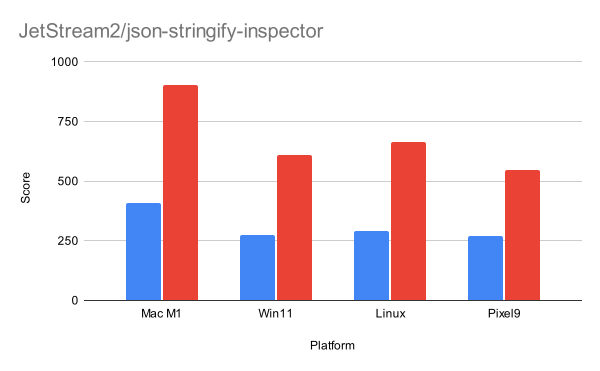
JSON.stringify is a core JavaScript function for serializing data, directly affecting common operations across the web—from sending data in network requests to saving data in localStorage. A faster JSON.stringify means quicker page interactions and more responsive applications. Recently, the V8 engine introduced optimizations that make JSON.stringify more than twice as fast in many common scenarios. This tutorial explains how those optimizations work and, more importantly, how you can write code that takes full advantage of these speed improvements. You'll learn about the side-effect-free fast path, iterative serialization, and string handling changes that enable these gains.
Prerequisites
To follow this guide, you should have:
- Basic working knowledge of JavaScript and JSON.stringify
- Familiarity with browser developer tools or Node.js for testing
- An understanding of V8 as the JavaScript engine in Chrome and Node.js (optional but helpful)
Step-by-Step Instructions
1. Understand the Side-Effect-Free Fast Path
The most impactful optimization is a new fast path that V8 uses when it can guarantee that serialization will not trigger any side effects. A side effect is anything that breaks the simple, streamlined traversal of an object—this includes executing user-defined code during serialization (like custom toJSON methods or getters) and even subtle internal operations that might trigger garbage collection. When V8 is certain the object is a plain data structure with no such side effects, it bypasses many expensive checks and uses a highly specialized implementation, resulting in a major speedup.
How to leverage this: Use plain objects and arrays that contain only primitive values (numbers, booleans, strings) or other plain objects and arrays. Avoid:
- Custom
toJSON()methods - Getters that execute logic
- Proxy objects
- Objects with Symbol or Function properties that may be filtered out but still cause internal checks
2. Use Iterative Serialization for Deep Objects
The new fast path is iterative instead of recursive. This eliminates the need for stack overflow checks and allows V8 to quickly resume after encoding changes. Consequently, you can serialize significantly deeper nested object graphs than before without hitting recursion limits.
Practical tip: If you work with deeply nested data (e.g., configuration objects, JSON from deep APIs), you can now rely on V8's faster handling. There's no special code required—just ensure your objects are plain and side-effect-free, and V8 will automatically use the iterative fast path.
3. Optimize for One-Byte Strings
V8 internally represents strings in two flavors: one-byte (for ASCII characters) and two-byte (for characters outside ASCII, like emoji or accented letters). Two-byte strings use double the memory per character and require different handling. The optimized JSON.stringify now compiles two separate, specialized versions of the serializer: one completely optimized for one-byte strings and another for two-byte strings. This avoids constant branching and type checks.
How to take advantage: Where possible, use ASCII-only strings in your data (e.g., property names, simple values). If you need Unicode characters, V8 will handle them efficiently via the two-byte path, but if you can limit Unicode to only where necessary, more of your serialization will hit the one-byte fast path.
4. Code Examples: Comparing Performance
Run the following examples in a modern Chrome or Node.js version to see the speedup. We'll compare a plain object (fast path) versus an object with a custom toJSON method (slow path).
// Fast path – plain object
const plainObj = {
  user: 'Alice',
  age: 30,
  address: {
    city: 'Toronto',
    zip: 'M5A1A1'
  }
};

console.time('fast');
for (let i = 0; i < 100000; i++) {
  JSON.stringify(plainObj);
}
console.timeEnd('fast');

// Slow path – custom toJSON
const slowObj = {
  ...plainObj,
  toJSON() {
    // Simulate a side effect
    return { ...this, timestamp: Date.now() };
  }
};

console.time('slow');
for (let i = 0; i < 100000; i++) {
  JSON.stringify(slowObj);
}
console.timeEnd('slow');
You'll typically see the fast path run 2x or more faster. Experiment with deeper nesting or getters to see even more dramatic differences.
Common Mistakes
Using custom toJSON unnecessarily
Many developers add a toJSON method to objects to customise serialization, but often the same result can be achieved with a simple plain object transformation before calling JSON.stringify. Avoid toJSON if you don't need dynamic output during serialization.
Relying on getters that perform work
Getters are executed during JSON.stringify. If they access a database, call a function, or generate a random value, V8 cannot use the fast path. Precompute values and store them as plain properties.
Using Symbols or BigInt values
Symbol and BigInt are not serializable by JSON.stringify. Their presence doesn't necessarily slow things down (they're ignored), but they can indicate your object isn't a simple data structure. For performance, keep your data to strings, numbers, booleans, arrays, and plain objects.
Mixing string types in property names
If your keys contain non-ASCII characters, V8 will use the two-byte serializer for the whole string serialization. While this is still efficient, consistently using ASCII keys can keep you on the slightly faster one-byte path.
Summary
By understanding V8's new side-effect-free fast path, you can write JavaScript that maximizes JSON.stringify performance. Key takeaways:
- Use plain objects and arrays without custom
toJSON, getters, or proxies. - Take advantage of iterative serialization for deep nesting.
- Prefer ASCII strings when possible to leverage the one-byte specialized serializer.
- Avoid common pitfalls that force V8 into the slower general path.
With these practices, your applications will see up to a 2x speed improvement (or more) in serialization, leading to faster page loads and more responsive user experiences.
Related Articles
- Crafting Zigzag Patterns with CSS Grid and Transform
- Nibble: A Minimalist Single-Pass LLVM Frontend in Pure C
- Create a Dynamic Zigzag Layout with CSS Grid and TranslateY
- Mastering Markdown in Astro: A Comprehensive Guide
- Embracing Unpredictability: The Impact of Native Randomness in CSS
- Optimizing Code Review Diffs: GitHub's Performance Overhaul for Large Pull Requests
- How Copilot Studio Boosts Performance with .NET 10 WebAssembly Upgrade
- Mastering Diff Performance in Large Pull Requests: A Step-by-Step Optimization Guide