Boosting JSON.stringify Performance by Over 2x: A Deep Dive into V8's Optimizations
Overview
JSON.stringify is a core JavaScript function used everywhere—from sending data over a network to saving user preferences in localStorage. Its speed directly impacts web application performance. In recent V8 engine updates, engineers achieved a performance improvement of more than 2x for this critical function. This tutorial explains how they did it, breaking down the key optimizations into actionable steps you can understand and even apply to your own code patterns.
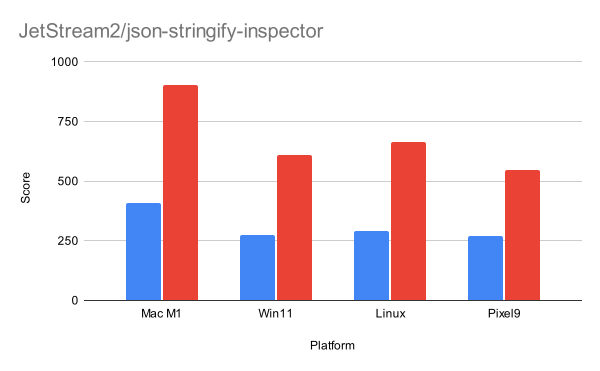
We'll explore three main innovations: a side-effect–free fast path, an iterative architecture, and templatized string handling. By the end, you'll know what makes JSON.stringify slow, how V8 avoids those pitfalls, and how to write objects that benefit from the fastest path.
Prerequisites
To get the most out of this guide, you should have:
- Basic understanding of JavaScript and JSON serialization.
- Familiarity with V8 engine concepts (garbage collection, class hierarchies) is helpful but not required.
- Access to a modern browser (Chrome 88 or later) to test the performance yourself (optional).
Step-by-Step: Understanding and Leveraging the Optimizations
Step 1: Recognize the Problem – Side Effects
The general-purpose JSON.stringify implementation must handle all possible user-defined behavior, including:
- toJSON() methods on objects that can return custom values.
- replacer functions that modify the serialization process.
- Garbage collection (GC) events triggered by object flattening or string manipulation.
These are called side effects. When the engine cannot guarantee their absence, it stays on a slower, defensive path that checks for these conditions at every step. The breakthrough: V8 introduced a fast path activated only when the engine can prove the serialization is side-effect–free.
Step 2: How to Write Side-Effect–Free Objects
To benefit from the fast path, your objects should:
- Not define a
toJSON()method (unless you really need it). - Not use a custom
replacerfunction in the stringify call. - Contain only plain data types:
Object,Array,String,Number,Boolean,null, andundefined. - Avoid properties that are functions or symbols.
Example of a fast-path-friendly object:
const data = {
  name: "Alice",
  age: 30,
  hobbies: ["reading", "hiking"]
};
// This will use the fast path.
console.log(JSON.stringify(data));
In contrast, an object with a toJSON() method forces the slow path:
const bad = { x: 1, toJSON: () => 42 };
// Fast path not used.
Step 3: The Iterative Approach – No More Recursion Limits
The general-purpose serializer uses recursion, which risks stack overflow on deeply nested objects and requires extra checks. The new fast path is iterative. This means:
- No stack overflow checks needed, allowing safe serialization of extremely deep objects.
- Encoding changes (e.g., switching from one-byte to two-byte strings) can be handled efficiently without rewriting stack frames.
You can test this yourself: try serializing a deeply nested object (e.g., 100,000 levels) with both old and new V8 versions. The iterative fast path will succeed where recursion might crash.
Step 4: Templatized String Handling – No Branching Overhead
Strings in V8 are stored as either one-byte (ASCII) or two-byte (Unicode) characters. The old serializer had to check the character type at every position, causing branch mispredictions. The new code templates the entire stringifier on the character type, producing two specialized versions:
- One-byte fast path: optimized for ASCII-only content.
- Two-byte fast path: optimized for mixed or full Unicode content.
This eliminates runtime branching and improves cache locality. The trade-off is a slight increase in binary size, which V8 engineers considered worthwhile.
If you're writing your own serialization code, consider similar specializations. For instance, in a custom JSON-like serializer, you could compile separate functions for ASCII and Unicode input.
Common Mistakes
1. Assuming All Objects Use the Fast Path
Not true. If your object contains a symbol key, a function value, or a custom toJSON(), V8 must fall back to the slow path. Avoid these unless necessary.
2. Ignoring Replacer Functions
Even an empty replacer argument can prevent the fast path. Only use it when you have to.
// Forces slow path:
JSON.stringify(data, null, 2);
// Also forces slow path:
JSON.stringify(data, (k, v) => v);
3. Not Profiling Before Optimizing
Don't blindly restructure your data to match the fast path. Profile first to see if JSON.stringify is actually a bottleneck. Use Chrome DevTools Performance panel or console.time().
Summary
V8's JSON.stringify performance improvement stems from three core changes: a side-effect–free fast path that bypasses expensive checks, an iterative design removing recursion limits, and templatized string handling eliminating branching overhead. To take advantage, write objects without custom serialization methods, avoid replacer functions, and keep your data structures pure. The result? Up to 2x faster serialization in modern Chrome and Edge.
For more details on specific limitations and side-effect detection, see the limitations note inside Step 2 or consult the official V8 blog.
Related Articles
- Mastering Diff Lines at Scale: 10 Key Performance Strategies
- 10 Ways Explicit Compile Hints Supercharge V8 JavaScript Performance
- ShadowRealm: A New Frontier for JavaScript Execution Isolation
- GNU Compiler Collection 16.1: New Defaults and Experimental Frontiers
- 10 Things You Need to Know About Computing Discounted Prices in CSS
- GitHub Unveils Major Performance Overhaul for Pull Request Reviews
- Mastering Pull Request Performance at Scale: A Deep Dive into GitHub's Optimization Strategies
- Browser-Based Vue Testing Eliminates Node.js Dependency, QUnit Leads the Way